Using Buddy API in Tiggzi App Builder
Posted: September 6th, 2012 | Author: max | Filed under: API | Tags: API | No Comments »Buddy is a cross-platform mobile “backend as a service”. In Tiggzi app builder you can easily use any 3rd party REST API, including Buddy API. Every API is different and here is how to setup Buddy API. Buddy adds the actual action to invoke in the URL, after the ?, followed by any additional request parameters:
http://webservice.buddyplatform.com/Service/v1/BuddyService.ashx?UserAccount_Profile_Create&BuddyApplicationName=….&BuddyApplicationPassword=….
When setting up the service in Tiggzi REST editor, set the URL to:
http://webservice.buddyplatform.com/Service/v1/BuddyService.ashx
then define all other request parameters as usual:
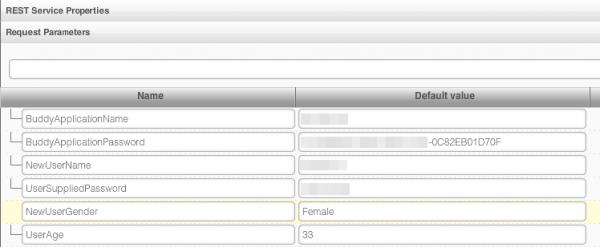
Once you setup all the request parameters you will be able to test the service.
Leave a Reply