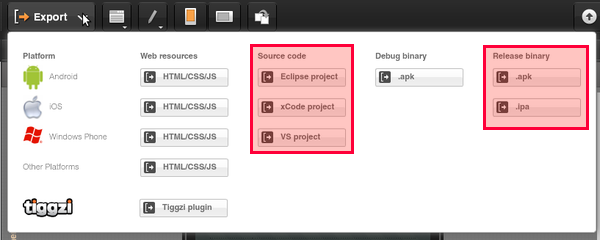
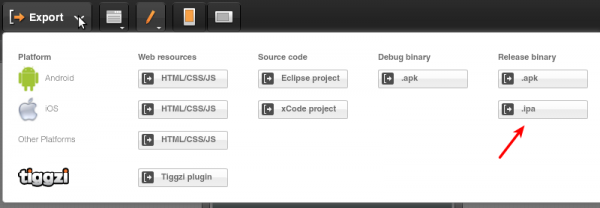
A very nice feature in Tiggzi app builder is the ability to quickly build (package) your app for Android or iOS:
You can also easily export the app source for Android, iOS, and Windows Phone 7.
When you a get a binary (.ipa) file form Tiggzi build service, it’s targeting iPhone 4 (we are working on complete iPhone 5/iOS 6 support). However, you can still build for iPhone 5/iOS 6 if you export the app source and build the app in xCode. Here is how to do it.
Export xCode project
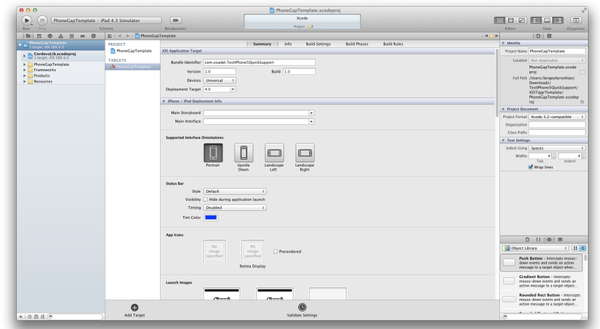
Open the downloaded project in xCode 4.5
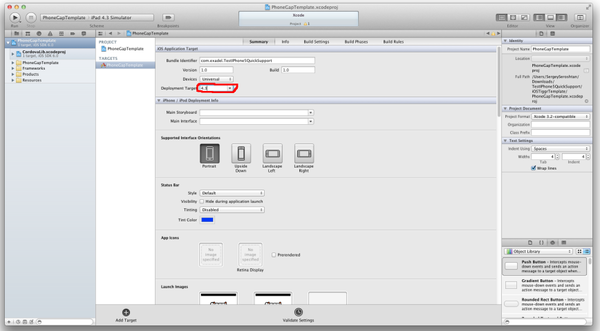
Change PhoneGapTemplate target settings: “Deployment Target” to 4.3
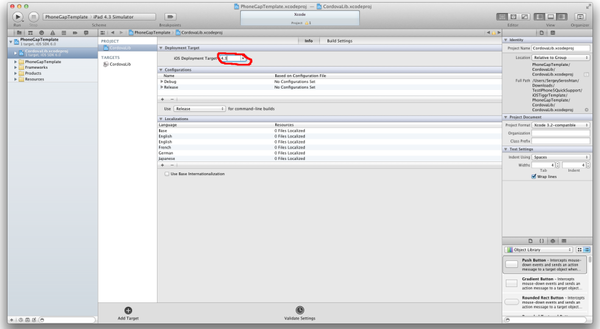
Change CordovaLib project settings: “Deployment Target” to 4.3
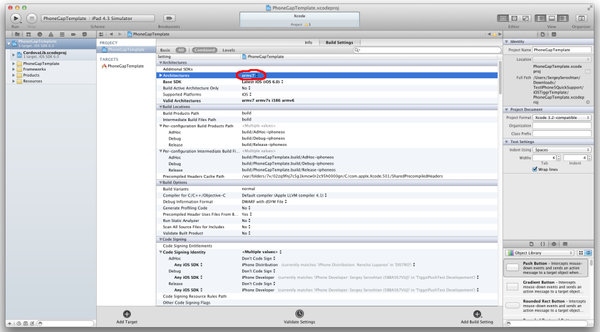
Change PhoneGapTemplate project settings: ”Architectures” to armv7
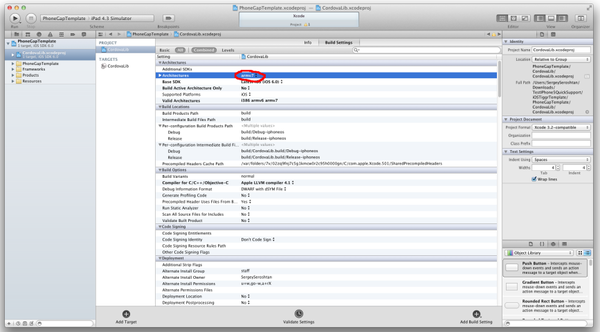
Change CordovaLib project settings: ”Architectures” to armv7
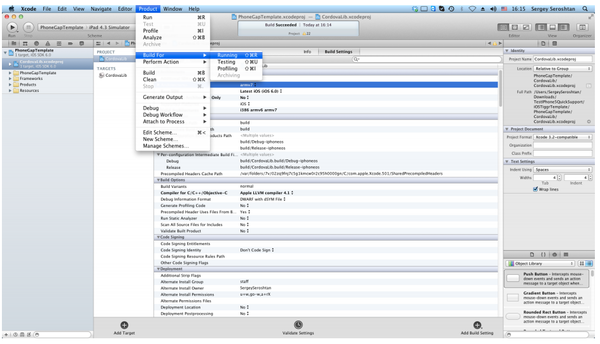
Build the project
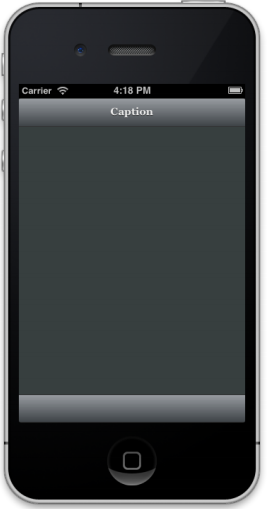
Run it on the device or iPhone 6 simulator
Image update
You still need to manually create image [email protected] (640 x 1136 pixels) and link it in XCode settings to your project. Thanks to Eric for this update.
In the past year or so, we have witnessed a major shift from client-server to client-cloud. This shift is primarily fueled by two factors: mobile devices exceeding desktop computers and the thousands of different APIs available on the Internet today. What started in early 2000 on eBay and Amazon has become a real revolution in 2012 with thousands of companies, from Twitter and Facebook to AT&T, offering cloud-based services.
REST API
One of the most common ways to access private or public service APIs is via REST requests.
In the client-server approach an organization builds applications that consume its own internal content and resources. However, even large IT organizations such as AT&T, Verizon and Amazon have come to realize that they are no match for the social consumer and social enterprise developers out there. By making APIs publicly available, these organizations hope that developers and “citizen developers” will come and build applications and mobile apps on top of their services.
Citizen developers at work
Analysts at Gartner see a trend toward app creation independent of IT. They predict that by 2014, citizen developers – employees outside of IT and software development – will build 25% of new business applications. In 2007, they built less than 5%.
One of the best-known API success stories comes from Amazon: Its cloud service APIs let outsiders access the company’s massive data centers. Twitter, with its deceptively simple 140-character message model, exploded thanks to its API. In fact, you probably read and write tweets via a Twitter application or mobile app rather than going directly to Twitter’s Web site. Facebook’s Graph API has spawned a whole industry of apps to support its hundreds of millions of users.
One of the really nice features we released in Tiggzi Mobile App Builder in April is the option to get iOS binary file for your app (similar to PhoneGap Build).
Export iOS app
Now you can create your mobile app in Tiggzi and instantly build the iOS binary file (or Android).
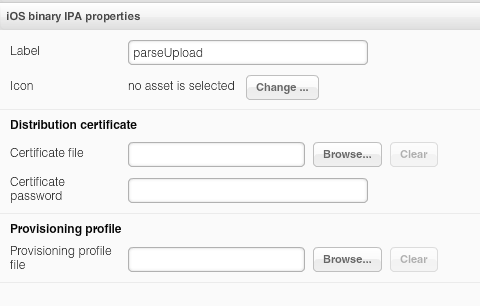
As we use the standard iOS build process, you will still need to provide your Apple developer information (nothing we can do about that, more information here on how to get it). The information is then set in project profile:
The Tiggzi team keeps making the great even better, as you can see in this latest release of Tiggzi Mobile App Builder. New features include everything from iOS binary builds to updated support for jQuery Mobile and PhoneGap. Read on to find out more. Read the rest of this entry »
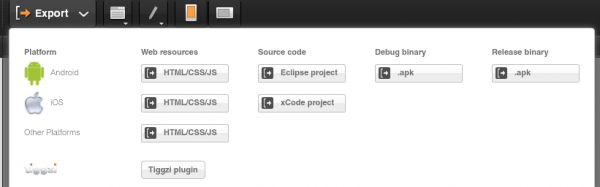
One of the really great features in Tiggzi mobile app builder is that you can quickly export the app as mobile Web, Android or iOS:
For Android, you can get a ready for the app market binary file (Release binary). Just take the file and upload it to Android Market. It’s that simple. You can watch a webinar where an app is built, exported for Android and published.
iOS is little bit more involved (Apple requires to provide your developer information to build). There are two ways to go about it. First, export the app as xCode project and then follow the steps outlined in this guide to build the app.
PhoneGap is one of the foundation technologies for Tiggr Mobile Apps Builder. Tiggr’s extensive capabilities in JavaScript customization allow developers an easy way to use the PhoneGap API to make native apps that access device features (like using the camera). In this webinar, we’ll show you how it’s done with hands-on examples and then you’ll have the chance to ask questions.
I’m sure you’ve heard about platform-as-a-service (PaaS) or cloud-based services like Google Apps Engine,CloudBees, Heruko, Engine Yard, and Cloud Foundry. All are excellent platforms that ease the process of managing, maintaining, and administering the platform on which an application you develop runs. Most tend to be focused on the hosting and managing side of the finished application. But what about a cloud-based service that enables you to build an app, and specifically a mobile app? Well, such a service already exists. The cloud-based service is called Tiggr Mobile Apps Builder.
If you have have done native mobile app development on Android or iPhone (iOS) then you probably know that testing native apps is not that simple. On the other hand, testing traditional Web applications is pretty straightforward: Launch a Web browser, and you see exactly how the application works and how it looks. Read on and I will show how to test a native app in a similarly straightforward fashion after considering various alternatives.
Option 1: Installing the app on the mobile device
This option is great in that you can test the app on the actual device. However, getting the app on the device can be very time consuming. And, for each testing iteration, the app would have to be built, sent (or copied) to the phone, installed, and launched on the device. While you get to test on the actual device, the process is very slow. Just imagine if you need to make just a small change in the app.
Option 2: Using device emulators/simulators
Getting the app on a device emulator is simpler than getting the app on the actual device. However, now the app is not tested on the actual device, so you may not be getting exactly the same behavior or look-and-feel that you would get on the actual device. Now, this is more of an Android problem than an iOS problem. The Android emulator runs a bare-bones Android version. Most Android phones from HTC, Motorola, and Samsung have their own, slightly modified builds of Android (even the same browser can be slightly different on different devices). Another problems with emulators (mostly Android) is that they are usually much slower than the actual devices, for obvious reasons. While the iOS simulator is pretty fast, the Android emulator is notoriously slow.
The Best Option: Launching the app on the device without installing
I consider this final approach the fastest and most straightforward. It doesn’t require installing the app on the device each time, but you still get to test on the device. This approach uses the Tiggr Mobile Tester app on the device while the mobile apps themselves are developed using Tiggr Mobile Apps Builder.
This tester app only needs to be installed once. The Android version is here and the iOS version is available as an open source version. The app is rather simple. After signing in to your Tiggr Mobile Apps Builder account, it will show a list of all mobile apps (native and Web) created in your Tiggr account. Here is how it looks:
Tiggr Mobile Tester
The most interesting part? Clicking (or tapping) on any project will launch the app. Make any changes to the app in Tiggr? Save the changes, and click the app in Tiggr Mobile Tester. You now get the new version, with all the changes. With this approach we get the best of everything. We don’t need to install the app each time, the app is tested on the actual device and last but not least, it’s very fast.
Still not convinced? Then sign up for Tiggr, create your first mobile app, install Tiggr Mobile Tester (Android or iOS) and test the app.