Posted: July 19th, 2012 | Author: max | Filed under: Tutorials | Tags: tutorials | No Comments »
If you run/test your app on Android you probably noticed that there is flickering or jumping when navigating between pages (there is no such issue on iOS). Here is a quick way to get rid of flickering.
Add the following JavaScript (Create New/JavaScript):
$.mobile.defaultPageTransition = 'none';
$.mobile.defaultDialogTransition = 'none';
Above code will be invoked for all devices, including iOS. To run this code only for Android, use this;
if (navigator.userAgent.indexOf("Android") != -1) {
   $.mobile.defaultPageTransition = 'none';
   $.mobile.defaultDialogTransition = 'none';
}
Give it a try, you will notice that page transitations are now much smoother!
Posted: July 18th, 2012 | Author: max | Filed under: API, Database, Mobile Backend, Plugin | Tags: API, Database, Mobile backend, Plugin | No Comments »
Last weekend we participated in the AT&T Mobile Hacktathon hosted by StackMob. Just before the event we published StackMob API plug-in in Tiggzi app builder so that it would be very simple to connect to StackMob. Here is how easy it is to connect to StackMob.
In Tiggzi app builder, select Create New > From Plug-in, then select the StackMob plug-in:
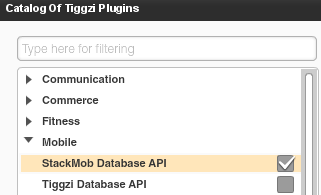
When you click to import the plug-in, you will be asked to enter StackMob key that identifies your app:
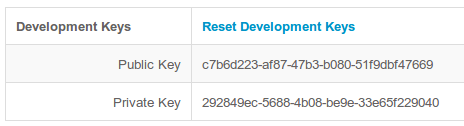
If you won’t enter the key right away, you can always set it by going to Services/StackMobDatabseSettings file.
The StackMob service looks like this:
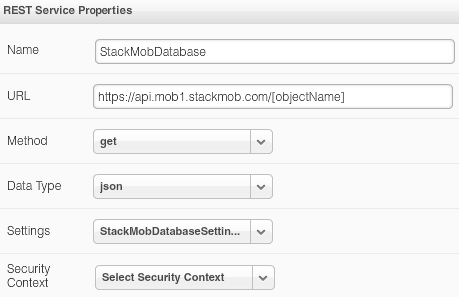
You will notice that the URL has [objectName] in it. Simple set it to the object schema name defined in StackMob. My object is called messages so the updated URL would be this:
https://api.mob1.stackmob.com/messages
The service does a GET by default but you can set it to do any other action.
We can now instantly test the service. Open Request Parameters panel and click Test Connection:
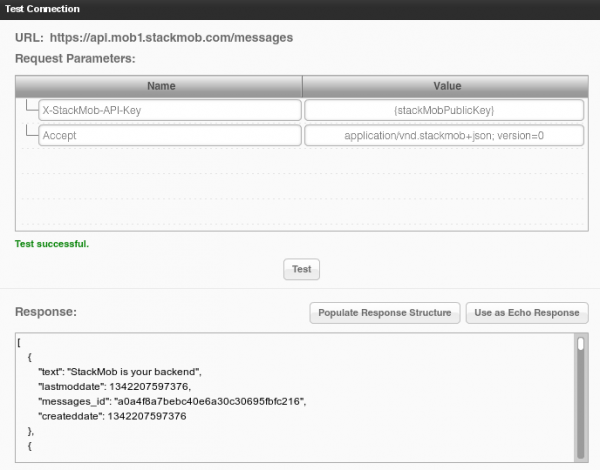
We get result back which means our service works (you should create a few sample objects in StackMob before testing). The service input is defined, we now need to define the service output. That can be done automatically by clicking Populate Response Structure button.
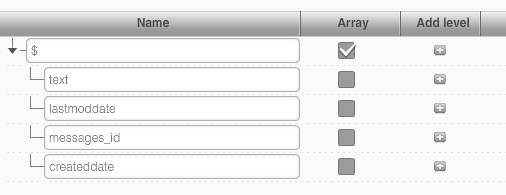
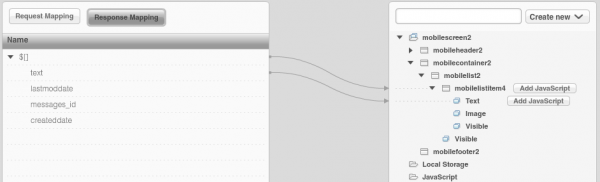
Once the service is ready, add it to the page, and bind the service to the UI:
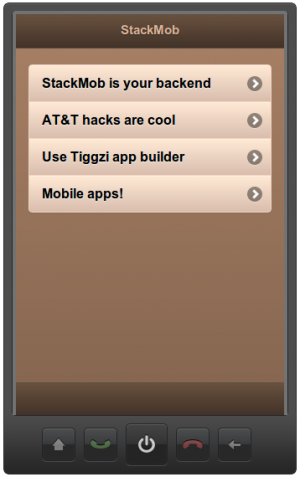
and finally run the app:
Posted: July 16th, 2012 | Author: max | Filed under: API, Database, Mobile Backend | Tags: API, Database, Mobile backend | No Comments »
In case you missed we just launched Tiggzi Database - a cloud database for your mobile app. It’s the first feature as part of our mobile backend services. We are working on really cool stuff such as Push and more!
Database API Plug-in
Creating a new service based on Tiggzi Database is very simple as each collection comes with a nice REST API hints:
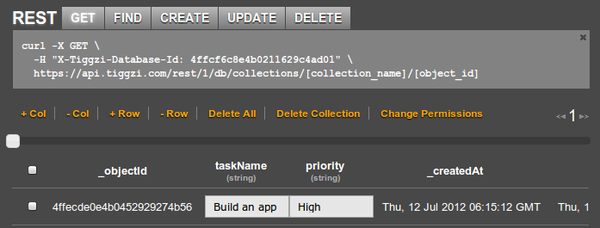
But there is even easier way to add a service by using Tiggzi Database API plug-in. From Project tab, click Create New > From Plug-in and select Tiggzi Database API plug-in:
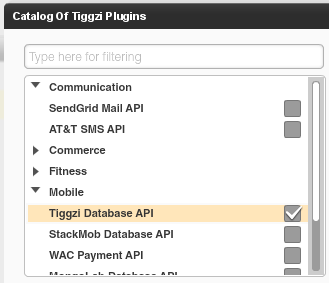
When you import the plug-in, you will be asked to enter the Tiggzi Database Id you can get from the REST API hint section (or from Dashboard tab). If you don’t set it during import, you can always set in Services/TiggziDatabaseSettings file.
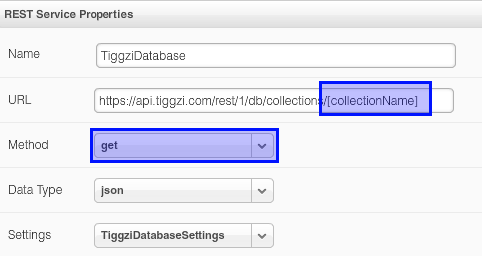
As you can see the URL is already set. Just set the collection and you will be ready to go. The service defaults to GET but you can change it to any method as shown. You can switch to Request Parameters, enter any request parameters and click Test. From Test, you can automatically define the service’s response structure.
The database key is also set in Request Parameters panel:
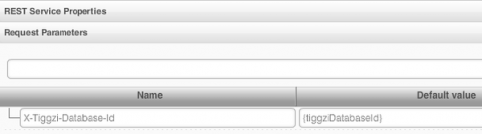
The {tiggziDatabaseId} is resolved from Services/TiggziDatabaseSettings file.
We got some really awesome integration planned very soon. Right from Tiggzi app builder you will be able to browser and create new collections.
Documentation
Looking for docs? View Tiggzi Database docs. We are also working on some really nice tutorials. If you have any questions, you can always email us or post on our forum.
Posted: July 13th, 2012 | Author: max | Filed under: Features, New release | Tags: features, release | 2 Comments »
In addition to Tiggzi Database (which is a pretty big feature), there are a few other features we added back in June.
Simpler app creation
We greatly simplified new app creation wizard. Just enter the app name and select whether you want a phone or tablet app. That’s it.
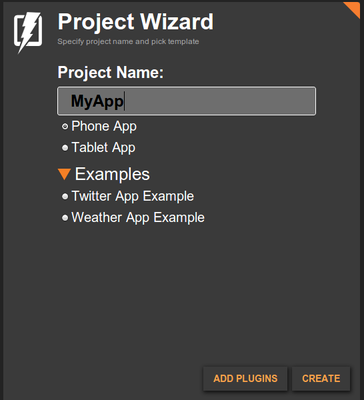
By default Tiggzi creates an app that includes Apache Cordova (PhoneGap). This means you can export the app to Android, iOS, and Windows Phone. You can also use any device API Apache Cordova provides.
We are going to simplify the app creation even more in the next release.
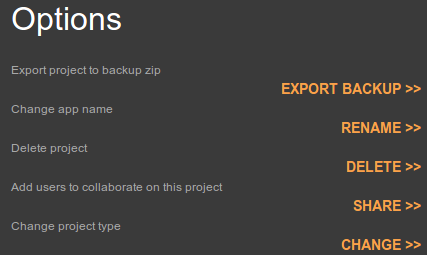
You might be wondering but what about mobile web app hosting? If you use any native device feature, then hosting as a mobile web app doesn’t make sense. But if you didn’t use any native features, then you want to be able to host. If you go to app options, you can now switch the app type from mobile app (hybrid) to mobile web by clicking Change for Change project type:
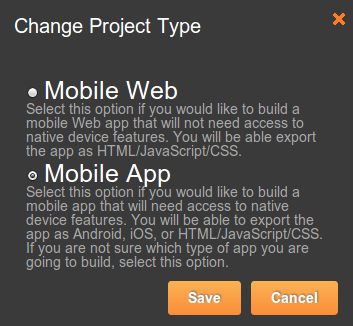
Select the new type and click Save:
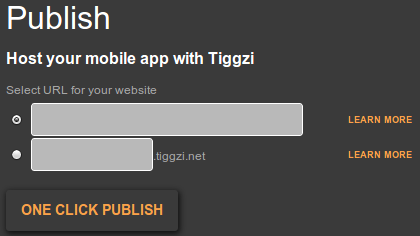
Once you switch the project type to Mobile Web, publish option will be enabled on the same page:
and also in the builder:

Simpler access to app settings
To access app settings you had to go to Project view, then Project > Project Profile. Now you can access project settings from the top level menu:

Project settings editor is divided into four panels:
- General - for setting app name, description, start page and selecting a theme
- External resources - for adding 3rd party JavaScript librararies
- Android binary APK properties
- iOS binary API properties
Faster
We made changes how Tiggzi web site and builder work so things should be running faster.
New List component options
Check out the List component, we added more option that you can configure from properties. If something is still missing, you can always use More Properties feature. Our goal is to make the list as configurable via properties as you can do in source code.
Posted: July 11th, 2012 | Author: max | Filed under: Database, Features, New release | Tags: Database, features, release | No Comments »
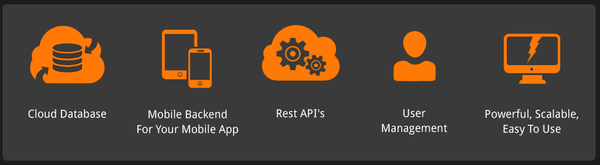
We are super excited the announce the availability of Tiggzi Database (beta). Tiggzi Database is a cloud database that provides a backend and storage for your mobile app. You already know that any using 3rd party REST API is very easy in Tiggzi app builder. Every REST API provides some specific functionality. For example, if you use Facebook API you can easily post a message to the timeline, but what happens if you need to store data specific to your app? Let’s say you are building a todo app - where can you store the list of things to do? That’s exactly where Tiggzi database comes in. It comes with elegant REST APIs so you can easily show, create, edit, and delete app data. Tiggzi database comes with built-in User Management. It’s powerful, scalable and easy to use. It works seamlessly with Tiggzi app builder.
You can access Tiggzi database today at http://io.tiggzi.com. From tiggzi.com, go to My Account, then click on Database.
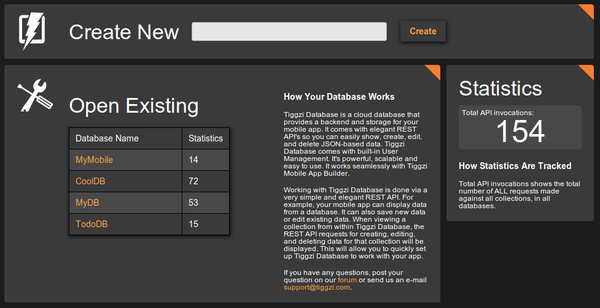
On the first page you can see a lit of all your databases, you can also create a new database:
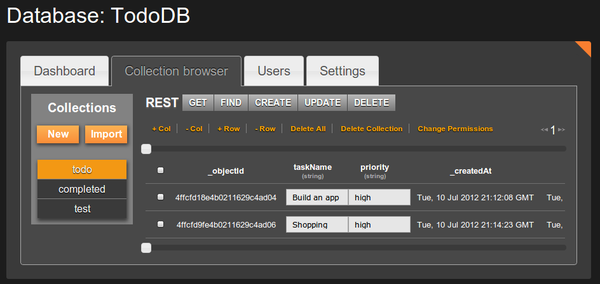
Once you select a database, you will see all the collections in the database:
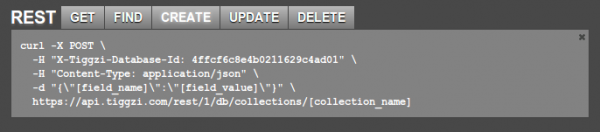
A very nice feature is that you get curl command hints. This will enable you to define a service in Tiggzi app builder very quickly:
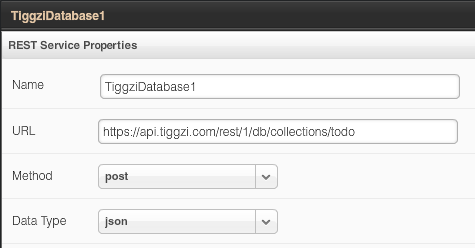
In Tiggzi app builder, defining a service is as simple as this:
Keep in mind that this service is still in beta. We got a lot more features we want to add, such as push, analytics and server-side code. Database docs are here. We also would love to hear your feedback. Let us know of the forum, email, Twitter or Facebook.
Posted: July 6th, 2012 | Author: max | Filed under: Articles | Tags: article | 1 Comment »
Written by WebHostingSearch.com Team

Mobile devices are now more powerful than what the industry offered before. It can now be used as an alternative to your desktop, offering almost the same amount of functions. You can bring your mobile devices wherever you go as long as you have the applications that can solve your problems. With this, the demand for apps constantly grows and as this happens, cloud services make the management of infrastructure easier for the users making it more attractive for them. Cloud based applications continuously capture the interest of the market.
While it seems complicated to build a cloud based mobile app, Tiggzi, a service developed by Exadel that captured our interest with their previous web prototype builder, now offers the easiest and fastest way to create mobile app for HTML5.
Tiggzi is an easy-to-use builder as it does not require installation and easily connect to any cloud services using REST. An interesting builder that is loved by many professional developers and beginners because of the support and helpful tutorials it provides. It also lets developers use REST API for their apps and build a beautiful mobile UI.
Tiggzi offers an easy way to export your app to mobile web and the app source code. Last month, Tiggzi announced that SendGrid is now available as API Plugin for their app builder. You can send outgoing messages from your mobile app using this plugin.
Web Hosting Search team is proud to announce that Tiggzi becomes part of our list of Best Mobile App Builder in our directory. WebHostingSearch.com was established year 2000 and started looking for recommended tools since 2008. The inclusion of Tiggzi was based on the number of suggestions from our web development team and community.
“Welcome to our community!” –WHS Team
Posted: June 29th, 2012 | Author: max | Filed under: API, Articles | Tags: API, article | No Comments »
By David Schoenbach, Vice President of product management at Exadel Inc.
The cloud is where it’s at. It’s where business data resides. It’s where social user-generated content sits, where forward-thinking creators place their tools. Unfortunately, the cloud is also the place all that good stuff stays, unused and unloved. That is, unless you offer smart ways to access it. That is where a web API comes in.
Just as the power of crowds has populated the social content repositories of Web 2.0 — YouTube videos, Facebook updates, tweets, and more — the web API enables designers and developers to re-purpose the body of knowledge that is the cloud. Here are some examples of how companies have used a web API to create more value.
Read more →
Posted: June 22nd, 2012 | Author: max | Filed under: Events | Tags: events | No Comments »
The Tiggzi Team is going to be at these events in the next couple of weeks. If you are there, stop by and say hello.
- jQuery Conference, June 28-29, San Francisco
Tiggzi is sponsoring the conference so stop by our table and watch how to build a mobile app with jQuery Mobile.
- Miami TechMeetups: CloudBase & Startup Night #tmuCloud, June 28, 7pm ET (4pm PT). Web demo.
- The NYC JavaScript & HTML5 Monthly Hackfest, July 11, New York City
In New York? Attend this awesome meetup and learn how to build apps with cloud tools
- AT&T Mobile Hackathon, July 13-15, San Francisco
AT&T Hackathons are the best, if you have an interesting app idea you should be here.
- DevCon5, API Plug-ins and Mobile App Development, July 23, New York City
In New York? Learn how to build mobile apps with API’s and API Plug-ins.
- An Evening with MongoDB, July 25, San Diego
Learn how to build mobile apps connected to MongoDB database.
Posted: June 20th, 2012 | Author: max | Filed under: API, Plugin | Tags: API, Plugin | 2 Comments »

If you plan to use MongoLab database in your app, it’s now even simpler with our new MongoLab database plug-in. Here is how to create one.
Click to import a plug-in:

then select Mobile and click MongoDB Database API:
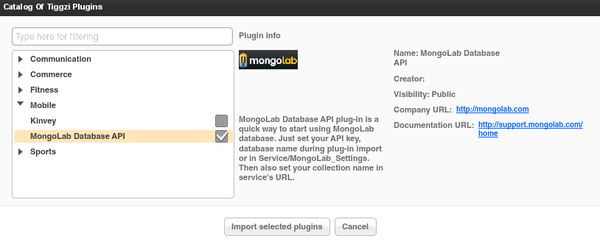
next you will be prompted to enter database API key and database name. Both values can be found in your MongoLab account:

If you don’t set these values during import, don’t worry. You can also set them in Services/MongoLab_Settings after the import.
In addition to API key and database name you also need to set the collection name (as we don’t have that information). The collection name is defined and set in Request Parameters panel:

In the Default Value column enter the collection name. You may also set the collection name directly in the URL. The reason collection name is set in request parameters and not in the settings file is because it will change often while the other values are most likely going to stay the same.
Once the service is imported, you can test the service and automatically create the response structure from it.
Posted: June 18th, 2012 | Author: max | Filed under: API, Plugin | Tags: API, Plugin | No Comments »

We were getting a lot of questions how do you send email from your mobile app? We would always tell user to use SendGrid, a wonderful cloud service that provides REST API for sending out emails. Today we released SendGrid Mail API plug-in in Tiggzi. All it takes now is a few clicks and you are ready to send emails from your mobile app.
To import the plug-in, click the block button in Project view:

Open Communication category and select SendGrid Mail API:
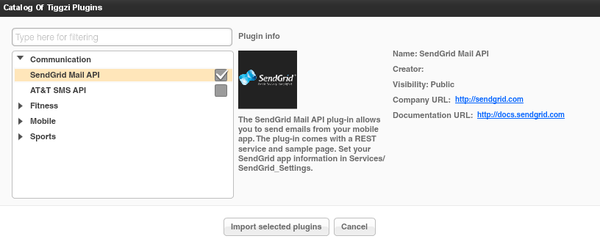
Click Import selected plug-ins button. You will be prompted to enter api_user and api_key values. Before being able to send out emails with SendGrid you need to sign up for an account (they do offer a free plan). You will then get a api_user and user_key. You may skip entering these values right now. You can always set them in Project/SendGrid_Settings.
Once the plug-in is imported, you will have page called Sendmail that looks like this:
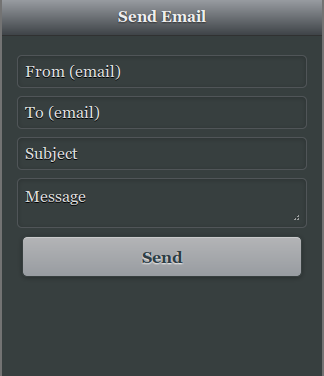
The UI is built with jQuery Mobile.
You can also open the REST service (SendGrid_MailSend). The URL is defined here:
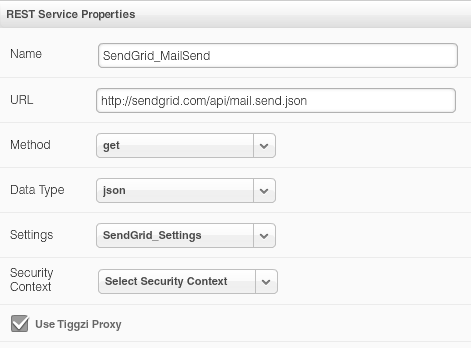
Request parameters:
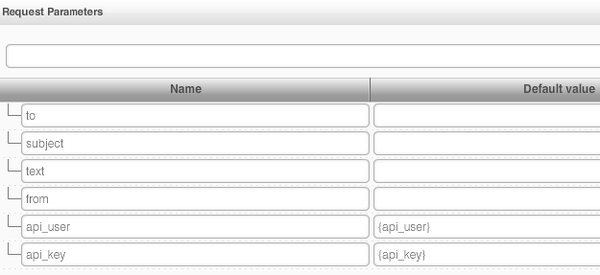
{api_user} and {api_key} are set in SendGrid_Settings.
And finally the service mapping (UI to service):
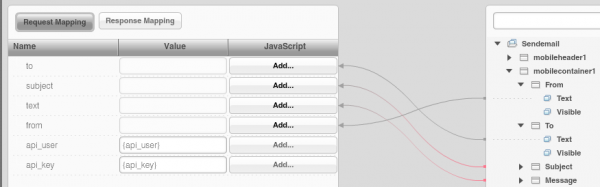
This REST service has additional option parameters which are described here. You may modify the service as you need. SendGrid provides other API’s that you can find here.
Have fun building apps in Tiggzi, now with SendGrid email API.