Tiggr – the easiest platform for building mobile apps in the cloud
Tiggr is a cloud-based mobile apps builder. It lets developers build HTML5/JavaScript and native apps very quickly, entirely in the cloud. There is nothing to download, nothing to install, and nothing to configure. Just create a new project, and you are ready to start building your mobile app with HTML5/JavaScript and PhoneGap.
Continue reading Building Mobile Apps in the Cloud with Tiggr and PhoneGap
We recently upgraded Tiggr to use PhoneGap 1.2. Any mobile app (native) that you create, PhoneGap is automatically installed. You can export the app as native and also use PhoneGap API in your mobile app.
Updated:
You can always find the version number by going to Project > Project Profile > External resources:
We just returned from app world conference in New York which was a great success. Next week we are heading to 2 more great events: AnDevCon conference and Mountain View JavaScript Meetup.
AnDevCon
Tiggr Mobile Apps Builder (Exadel) is going to be at AnDevCon II (The Android Developer Conference) in San Francisco Bay Area, November 6-9. Stop by our booth and learn how to build Android apps ready for the Android Market using cloud services, all in about 5 minutes. It’s really awesome, I promise.
Mountain View JavaScript Meetup Group
Building apps with Tiggr, A Cloud Service for Building Mobile Apps
Wednesday, November 9, 2011, 7:00 PM
In this cool session you will learn how to build HTML5 and native apps using Tiggr. Tiggr is a cloud-based mobile apps builder that uses HTML5, jQuery Mobile, REST, and PhoneGap to build apps. A real mobile app will be built during the session, which attendees will be able to run and test on their own devices.
PhoneGap is one of the foundation technologies for Tiggr Mobile Apps Builder. Tiggr’s extensive capabilities in JavaScript customization allow developers an easy way to use the PhoneGap API to make native apps that access device features (like using the camera). In this webinar, we’ll show you how it’s done with hands-on examples and then you’ll have the chance to ask questions.
I’m sure you’ve heard about platform-as-a-service (PaaS) or cloud-based services like Google Apps Engine,CloudBees, Heruko, Engine Yard, and Cloud Foundry. All are excellent platforms that ease the process of managing, maintaining, and administering the platform on which an application you develop runs. Most tend to be focused on the hosting and managing side of the finished application. But what about a cloud-based service that enables you to build an app, and specifically a mobile app? Well, such a service already exists. The cloud-based service is called Tiggr Mobile Apps Builder.
One of the most important features in Tiggr is being able to export the app as HTML5 mobile app, Android app or iOS native app. All export features are show by clicking the big Export button:
As you noticed, there is currently no BlackBerry option. But, it turns out it’s pretty easy to get a BlackBerry native app.
Any app in Tiggr, be it for Android, iOS or BlackBerry is built first with jQuery Mobile component, HTML5, JavaScript and CSS. Then, the app is packaged as native with PhoneGap. For BlackBerry, simply export the app as HTML/CS/JS, and to build a native we are going to use PhoneGap Build.
Here are the steps:
Build an app in Tiggr (try getting started guides) and export it as HTML/CSS/JS
Our last webinar, “Building Mobile Apps with jQuery Mobile and PhoneGap,” was a great success. If you missed it you can still get to a recording of it by following the registration link and registering (or just typing in your e-mail address if you’re already registered.)
Also, following up on a question from this last webinar, we’re putting together a webinar on using the PhoneGap API in Tiggr scheduled for October 27th. Watch for more details on the blog.
If you don’t know what Tiggr is, Tiggr is a Web-based mobile apps builder or a mobile RAD (Rapid Application Development) tool. It enables developers to build mobile Web and native apps very quickly. Tiggr comes with a visual editor and jQuery Mobile components. You simply drag and drop components into the phone area.
This makes it very easy to prototype and build the UI. Once you have developed the UI (which you can share and test in browser or mobile device), you define and connect to REST services. Once the service is defined, it is mapped to the UI. A service usually has inputs and outputs. Mapping means taking input from UI (such as input component) and using it as input for the service. On the other side, taking service output and mapping it back to the UI, for displaying the result. One last step is usually adding an event to invoke the service. For example, on a button click the service can be invoked. What I just described is a very easy and fast way to build mobile Web apps. There is nothing to setup or configure, just launch the Tiggr visual editor and start building.
Now, how do you get a native app? That’s where PhoneGap comes in. PhoneGap is an open source framework, it wraps your mobile Web app and gives you access to native device API. To use native features, PhoneGap provides very clean and elegant API. For example, to sound a notification beep twice, you need to call the following:
navigator.notification.beep(2);
Simple, right?
To get device information, the following code is used:
Any native mobile project in Tiggr comes configured with PhoneGap version 1.0. How do you invoke this API when building a mobile app in Tiggr? It’s very simple. Tiggr comes with Run Custom JavaScript action which can be invoked on any HTML event. Let’s take a button. When a button is clicked (click event), you add an action (Run Custom JavaScript) to invoke. That’s it. Inside the Run Custom JavaScript, you can run any custom JavaScript.
You start with a button, we will use the Vibrate button:
Add click HTML event to the button:
Add Run Custom JavaScript action:
and finally add PhoneGap JavaScript call:
navigator.notification.vibrate(1000);
Another option is to create a JavaScript file (Project > JavaScript), write all the custom code there in functions and then invoke any function via Run Custom JavaScript action.
JavaScript file:
Invoking a function from the custom JavaScript file:
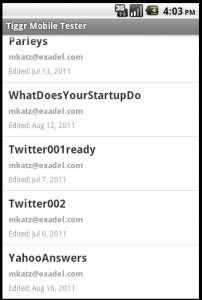
Once you use native API, testing in Web browser is no longer possible. To make it super easy to test your native app, you can use Tiggr Mobile Tester. It’s a native app (Android, iOS) which lists all your mobile projects created in Tiggr. You simply tap any app and launch the native app. The app looks like this:
Like what you see? Try Tiggr Mobile Apps Builder yourself!