Posted: January 31st, 2011 | Author: max | Filed under: Features, sharing and collaboration | Tags: features, HTML, sharing | No Comments »
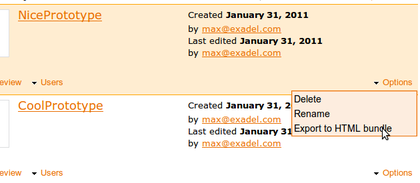
Although you can preview a Tiggr prototype in a browser and share the link, sometimes you might want to get the entire project - all the pages, JavaScript and CSS and run it locally on your machine or send it to someone. All you need to do is export the prototype as HTML bundle and you will get all the pages, JavaScript and CSS.
When in Projects page, select Options/Export as HTML bundle. You will be prompted to save a zip file containing your complete prototype.
Posted: December 7th, 2010 | Author: max | Filed under: Features, sharing and collaboration | Tags: collaboration, features | No Comments »
After a major 1.2 release which included mobile palette based on jQuery Mobile components, we pushed a minor 1.2.2 update mostly with bug fixing and other improvements. One important update in 1.2.2 is that collaboration now works behind any firewall. Before this release, Tiggr used a port other than 80 for collaboration. We heard from users who are behind a firewall that collaboration just didn’t work for them. We updated Tiggr collaboration to work with port 80 so now everyone will have this feature working. Give it a try and let us know what you think.
Posted: November 29th, 2010 | Author: Mikhail Sorokin | Filed under: Features, Prototyping, sharing and collaboration, Tiggr | No Comments »
Max already mentioned in his posts how you can collaborate using Tiggr, in this post I want to elaborate little bit more on this.
What collaboration tools Tiggr provides?
- Project sharing
- Whiteboard synchronization
- Built-in chat
- Prototype sharing
- Export as HTML bundle
Now let’s take a look at each of them.
Read the rest of this entry »