Posted: August 31st, 2011 | Author: max | Filed under: Tutorials | Tags: Android, tutorials | 1 Comment »
Yesterday we published a new Android Getting Started tutorial. It’s a very easy to follow, step-by-step guide on how to build a Hello World app and test in on an Android device.
Posted: August 30th, 2011 | Author: max | Filed under: Events | Tags: events | No Comments »
We’re excited to be a sponsor of the Mobile Merger event coming up on September 15th online. It’s an intensive 1-day event to bring you completely up to speed on incorporating the incredible promise of mobile into businesses now. All without having to travel anywhere – it’s an online event!
It will include 36 sessions covering all aspects of mobile in business: marketing, advertising, design, development, and more. Attendees have access to hours of online content (including some from us) and the ability to interact live with speakers and other attendees. Find out more and then register. We’ll “see” you there.
Posted: August 15th, 2011 | Author: max | Filed under: Tutorials | Tags: tutorials | No Comments »
We just published a new step-by-step tutorial: Building Weather App.
Want more? You can also try our Building Twitter Search App step-by-step tutorial.
Posted: August 8th, 2011 | Author: max | Filed under: Mobile Apps Builder | Tags: mobileappsbuilder | No Comments »
As we continue to add new features to Tiggr Mobile Apps Builder, we have also launched a new help site: http://help.gotiggr.com. It has documentation, getting started guides, how-to’s, release notes and road map. It’s work in progress. If we are missing something, do let us know via email [email protected] or http://getsatisfaction.com/gotiggr.
Posted: August 5th, 2011 | Author: max | Filed under: Review | Tags: review | No Comments »
Recent Tiggr Mobile Apps Builder reviews:
- Tiggr Mobile Apps Builder
- Tiggr - Cloud-based Mobile Application Development
Posted: August 3rd, 2011 | Author: max | Filed under: Events, Webinar | Tags: events, webinar | No Comments »
(Cross-posted from Exadel blog)
In trying to figure out the best way to keep our community informed, we’ve decided to try something different. We try to put on webinars that span about an hour, but that’s a big chunk in someone’s day. We wanted to shoot for something that would need less of a commitment — more like the length of a break. For us, this length of time would allow more focus and be easier to produce.
So, we’ve started a weekly series of “Tiggr Bites” to zoom in on different aspects of Tiggr as it continues to evolve. Each one will last for no longer than 20 minutes. Here’s what we’ve done so far and what’s on the schedule:
| Topic |
Date/Time |
|
| Collaborative Software Development in the Cloud Made Easy |
July 28, 2011 (11am Pacific Time) |
View recording. |
| Using the New Theme Editor in Tiggr |
August 4, 2011 (11am Pacific Time) |
Register now! |
| Connecting More Easily to REST Services in Your Mobile Apps |
August 11, 2011 (11am Pacific Time) |
Register now! |
This is only the beginning. We’ll be adding more topics in the next few months.
Posted: August 3rd, 2011 | Author: max | Filed under: Features, Mobile Apps Builder, New release | Tags: features, mobileappsbuilder, release | 4 Comments »
Earlier this week we released Tiggr version 2.3.2. Most of the updates are for Mobile Apps Builder. There is a new services editor, new jQuery Mobile theme editor and we launched a new help site.
New services editor with test feature
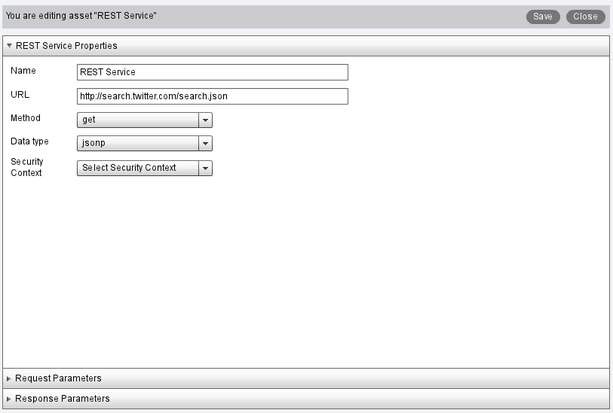
New services editor is now easier to use, it clearly separates service setting (such as name, URL ) and service request parameters and response parameters into separate panels.
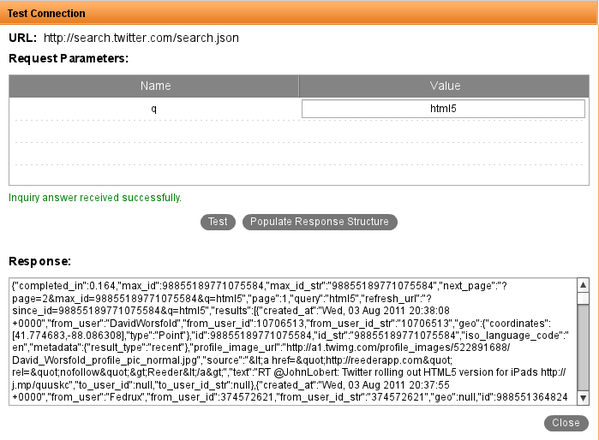
What’s really cool is that you can now test the service right from Tiggr. When entering the request parameters, there is a Test button. This allows you to check that the service works and what soft of output (JSON) is returned.
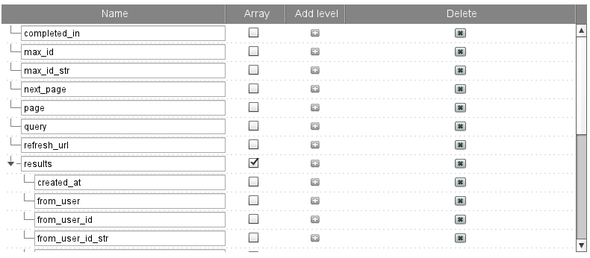
But, there is another very cool feature. Every service returns data and you need to define response parameters (which later can be mapped to components). Some services return many parameters and manually creating each parameter can be tedious. When you test the service there is Populate Response Button. When the button is clicked, all the output parameters from the service will be automatically created. Here is how it looks using Twitter’s search URL (http://search.twitter.com/search.json?q=html5):
Lastly, you can also paste the response from a service to auto create response parameters. This works sort of like an “echo” test. This is useful if you are not able to invoke the service but do know its response format. In Response Parameters panel, click Populate from Sample Response. Then, paste the response.
New jQuery Mobile theme editor
Mobile Apps Builder comes with 6 jQuery Mobile themes out-of-the-box. Now you can also create custom themes. To create one, in Project view, click Add > Theme. You will see the theme editor:
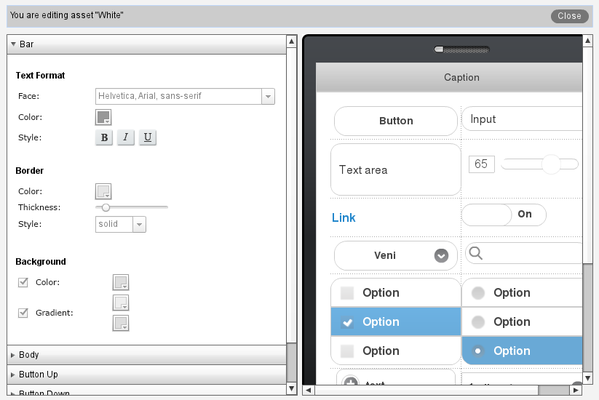
As you modify the theme (on the left), the phone on the right will instantly be updated with the changes.
New help site
We launched a new help and developers site: http://help.gotiggr.com. It’s still work in progress but do let us know if there is content you want us to add.