REST Service: Cross-domain Security, JSON, JSONP, and CORS
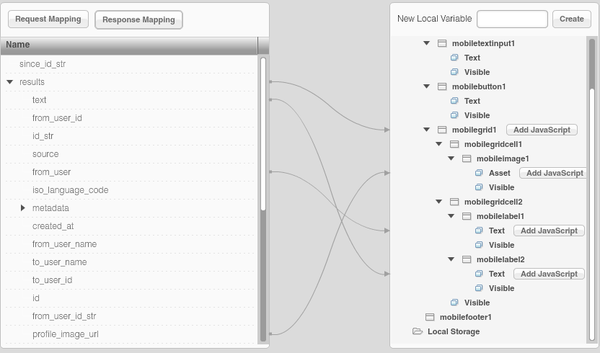
Posted: March 11th, 2012 | Author: max | Filed under: article, Features | Tags: article, features | No Comments »Tiggzi, the cloud-based HTML5, jQuery Mobile and PhoneGap mobile app builder come with a very powerful and easy way to define and consume REST services in a mobile app. Inside the builder, you get what amounts to a very easy to use REST services console where any service can be defined, tested, and have its response parameters automatically defined.
Being able to run and test the service from inside the builder is very important as it demonstrates that the service works and data is returned. The next step is usually to make the service available on the page, define UI-service data binding, and then set the service to be invoked on some event. But, when testing the app in a browser, the services sometimes doesn’t work or no data is returned. This creates confusion as the service worked when testing it inside the builder but doesn’t work when invoking from a browser page. The reason this happens is because of the cross-domain security built into browsers.
All browsers have this built into them. Basically, to invoke a service via JavaScript (AJAX) from a domain like mydomain.com, the page from which the service is invoked has to be hosted on that same domain, mydomain.com. When testing an app built in Tiggzi, the page is running on tiggzi.com but the service being invoked is on a different domain like, for instance, search.twitter.com. The browser won’t allow this. This is by design to ensure that no bad or malicious JavaScript code can be used to invoke the service.
What can we do? There are a number of options to make this work.
Hosting the page on the same domain
The most obvious option is to host the page and the service on the same domain. The solution is simple but not very practical today. With the new shift to a client-cloud architecture, many services used in mobile apps today are cloud-based, and are hosted via different API providers and thus are on different domains. Hosting the page and the service on the same domain might work well if services were deployed completely within the same organization.
JSONP (JSON with Padding)
JSONP is the unofficial way many provides solve the cross-domain problem. Instead of making a regular AJAX request which is subject to cross-domain security, the request is made via loading a JavaScript file with a special callback function defined. As loading a JavaScript file is not an AJAX call, it doesn’t fall under the cross-domain security problem. The callback function is then invoked to process the data returned (which is JSON). The URL looks like this:
http://someurl?callback=getthedata
getthedata would be invoked to process the response.
With JSONP, a service can be invoked from a page hosted on different domain. For example, Twitter’s API supports JSONP and thus can be invoked from tiggzi.com hosted pages. However, it’s up to the service to support JSONP and not all services support this feature.
Cross-origin resource sharing (CORS)
While JSONP could be considered a hack or a workaround, CORS is an attempt to create a standard way to solve the cross-domain issue. When a service request is made, the server will include a header parameter in the response indicating that the domain from which the call was made – is allowed to invoke this service. However, it’s up to the service providers to add such support. For example, the Parse mobile back-end service supports this feature and makes it very easy to use their services.
Tiggzi proxy
If none of the above options are available, Tiggzi Mobile App Builder provides a proxy service that works for testing and apps that are hosted on tiggzi.net. When using the proxy, the request is first sent to the proxy server and then, from the server, the request is made to the service. Because the request is sent from the server and not from the page, cross-domain security is not triggered.
Google Chrome with security disabled
Finally, one more option exists, but it’s only useful in development or testing. You can start Google Chrome with security disabled in which case the cross-domain issue is no longer a problem. To start Chrome with security disabled start it with this command line:
chrome –disable-web-security
Mobile Web app vs. mobile app
Everything I just described applies to mobile Web apps - pure Web apps running in the browser. When you develop a PhoneGap app (hybrid app) cross-domain security is not an issue, even though the app is actually running in a browser (albeit a chromeless one).
Next time you are trying a REST service, this should help you understand that’s really happening.
Originally published on Maxa blog.